Efuse Introduction
MP Tool – Efuse Page Overview
The Efuse page of the MP Tool is used to read the efuse content of the AmebaPro2 IC and to program calibration data (such as CH plan, Xtal_K, ThermalMeter and TX Power Index) into the efuse.
Mapfile (left side): shows the efuse map read from the IC in hexadecimal format.
Data fields (right side): shows the decoded data of the mapfile, e.g.
ID,MAC Address,CH plan (Hex),Xtal_K (Hex),ThermalMeter (Hex),BT ADDRandTX Power Index (Dec)for 2.4G and 5G. Make sure the suitable data is updated to the mapfile clearly.
Steps 1 to 3 correspond to the red labels in the figure below.
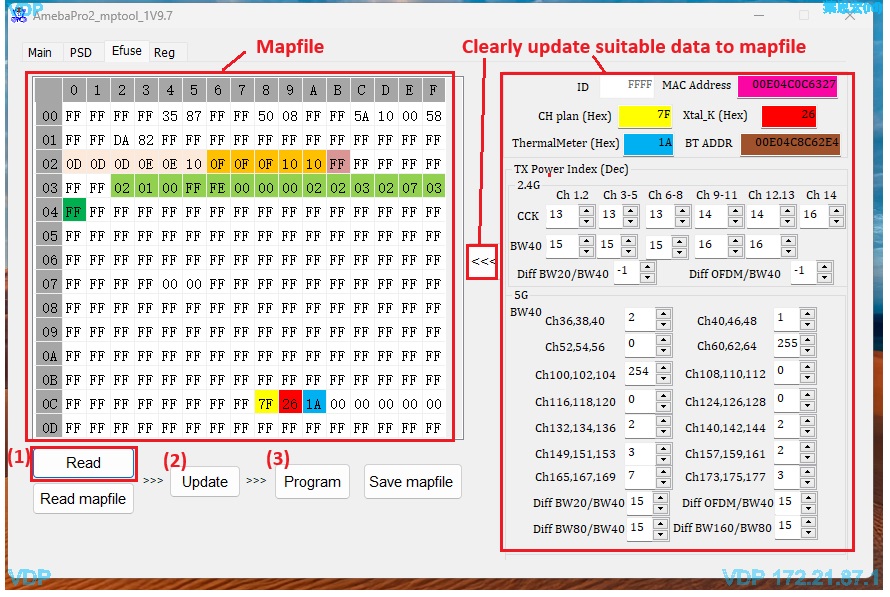
Fig. 24 MP Tool Efuse page
Read mapfile from IC Efuse
Click
Readto read the current efuse content from the IC. The result is shown in theMapfilearea, and the decoded values are shown in the data fields on the right side.Update
After modifying the data fields on the right side, click
Updateto apply the values to the mapfile.Program (PG)
Click
Programto write the mapfile into the AmebaPro2 efuse.
Warning
Steps 2 and 3 operate on the AmebaPro2 efuse based on the mapfile. Efuse is one-time programmable, and bits that have been programmed cannot be restored. Please use these operations carefully, and double-check the mapfile content before clicking Program.